
The AI Tab Manager for Chrome
Stop drowning in browser tabs. Tab Folio uses AI to organize, tag, and help you find any page instantly. Start free with 100 tabs per month.
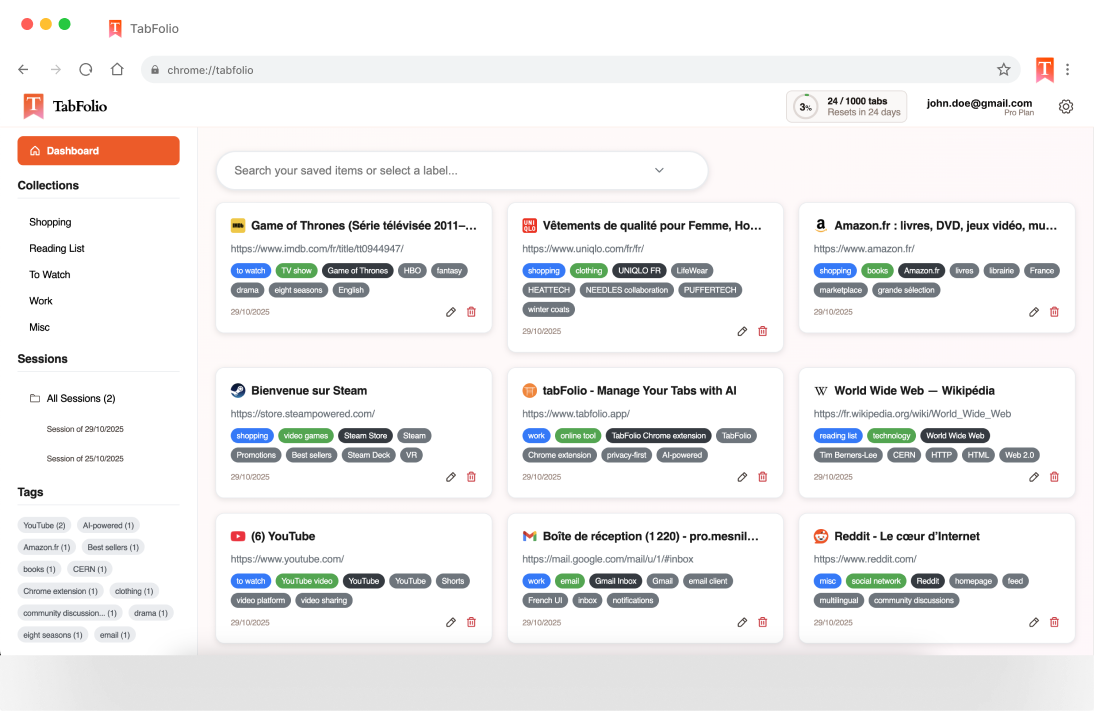
Everything You Need
Powerful features that make tab management effortless
AI Grouping
Intelligent algorithms automatically organize your tabs into logical groups. No more hunting through dozens of open tabs.
Smart Tagging
AI-powered tagging automatically labels your pages with relevant keywords for instant discovery later.
Powerful Dashboard
Search and filter through your saved tabs with ease. Find anything in seconds, even from months ago.
Privacy Focused
We only process what's needed for AI tagging. Your data is secure and never sold. See our Privacy Policy for details.
Perfect For
Tab Folio adapts to your unique workflow and needs
Researchers
Organize academic papers, citations, and research sources. Never lose track of that important study you found last week.
Developers
Keep Stack Overflow threads, documentation, and GitHub repos organized. Find that API reference when you need it.
Content Creators
Manage inspiration boards, references, and competitor research. Your creative resources, always at your fingertips.
Students
Organize course materials, assignments, and study resources. Keep your online classes and research perfectly organized.
Simple, Transparent Pricing
Start free and upgrade when you need more power
Free
- 100 AI tab analyses/month
- Smart grouping & tagging
- Powerful search dashboard
- Unlimited saved tabs
Pro
- 1,000 AI tab analyses/month
- All Free features
- Priority support
- Cancel anytime
How It Works
Get organized in three simple steps
Save Your Tabs
Click the Tab Folio icon and save individual tabs or entire groups with one click.
AI Does the Work
Our AI automatically groups similar tabs together and tags them with smart keywords.
Find Anything Instantly
Search your dashboard by tag, keyword, or group. Open any saved tab in seconds.
Your Privacy Matters
We process only what's necessary to provide AI-powered tagging. Your data is encrypted, secure, and never sold to third parties. You maintain full control over your information.
Frequently Asked Questions
Everything you need to know about Tab Folio
Using the latest AI technology to understand and organize your content with unprecedented accuracy
Ready to Declutter?
Join thousands of users who've reclaimed their browser
'/%3e%3ccircle%20cx='24'%20cy='24'%20r='9.5'%20style='fill:%231a73e8'/%3e%3cpath%20d='M34.3913,30.0029,24.0007,48A23.994,23.994,0,0,0,44.78,12.0031H23.9989l-.0025.0093A11.985,11.985,0,0,1,34.3913,30.0029Z'%20style='fill:url(%23b)'/%3e%3cpath%20d='M13.6086,30.0031,3.218,12.006A23.994,23.994,0,0,0,24.0025,48L34.3931,30.0029l-.0067-.0068a11.9852,11.9852,0,0,1-20.7778.007Z'%20style='fill:url(%23c)'/%3e%3c/svg%3e) Add to Chrome
Add to Chrome